MadLab Docu
Guide
MadLab Docu
Guide| Home MadLab Docu
Guide |
 |
Quick guided tour |
|
This is a quick guided tour describing the three most common uses of MadLab:
Setting up and solving your own problems
When MadLab starts, it does
not have a board opened. So first open a new board by clicking the "Create
new game" icon
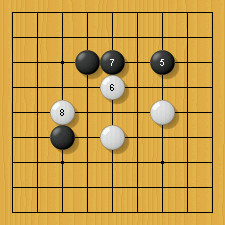
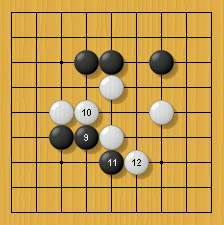
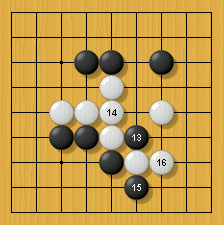
When you have entered the position, right-click on one of the two white stones. A popup menu appears: choose "Capture". MadLab thinks briefly and answers. Above the board MadLab tells you that the problem has lambda-order n=3, how many positions MadLab looked at, and that the solving move is at C6. Notice that the cursor is normal again, meaning that if you click on the board, it is a move for the White player (since MadLab has just played a black move).
Now you may try to play a
white stone at D6 in order to escape (just click at D6: it is White to
move, as indicated by the
Try retracting all the
moves by means of the "Delete last move" button
Abort the 'avoid-search' by
clicking the "Stop search" button
Again, retract all moves to
the original position by means of the "Delete last move" button
Try solving the problem by
clicking "Search: Obtain goal"
This problem
is hard, but if the goal was instead to capture either
the two white stones or the single white stone at B6,
it would solve quickly. To see this, right-click on one of the
two white stones at D5 and E5, and select "Capture 1 of 2...". This will
activate a white line pointing out from the selected stone. Drag the
line to the white stone at B6, and left-click. MadLab starts
searching and quickly finds a way to capture at least one of these
two blocks (by playing Black C5). If you click the "Set search
goal(s)" button
The above covers the
basics of entering and solving a position (but you may also want to
consult the ko example below). You can also search for connections
and eyes, and combine these in any way you like. All goals and
combinations hereof can be set up manually via the window activated
when hitting the "Set search goal(s)" button
When playing through
problems as either the attacking or defending side, you may get tired of
hitting the
MadLab can also solve ko problems. If you are interested in seeing a ko example, click the following link:
Solving the MadLab tesuji problems
MadLab comes with 997
tesuji problems extracted from real (mostly dan- or
pro-level) games. You can view and solve the problems in the
menu "File" --> "Open problems...". The problems are individual
sgf files, and they are basically unsorted regarding difficulty (but do
tend to get more difficult the higher the number is). The problems start
with a001.sgf and end with a997.sgf. Answers are included in the
sgf files: press the "Go one move forwards" button
The problems are a mix of single- and double-threat tesuji's. For the single-threat-tesuji's your goal is to capture the block 'a'. For the double-threat-tesuji's your goal is to capture either one of the blocks of stones marked 'a' and 'b'.
When you open one of these
problems, the parameters are automatically loaded. This means that in
order to see MadLab solve the problem, you can hit the "Search:
Obtain goal" button
If instead you want to try
solving the problem yourself, you may play the move you think
works and afterwards press the "Search: Avoid goal"
button
If instead the search goes
on, you will notice that the marked/colored points get eliminated one by
one, and in the end there are typically only a few left. Those moves
are the only possible moves for the defender, and the program will keep
searching indefinitely in order to try to refute any remaining move
candidates (even when there is only one possible defending move left, the
program keeps searching to see whether this move can be refuted as
well). So if MadLab keeps searching for a long time, this is a sign
that your attacking move probably did not work. When you stop
the search (
If you get tired of hitting
the
When you have finished a
problem, you may quickly load the next one by clicking the "Open
next sgf file"
In addition to solving individual problems, MadLab can go through your own games hunting for single- or double-goal tesuji's.
In order to familiarize
yourself with MadLab's analyzing capability, try to open a new board
by clicking the "Create new game" icon
These 16 moves are
the beginning of a 9x9 game between two professional players (Cho
Chikun (B) vs. Enda Hideki (W)). After having entered the moves,
retract them all to return to the starting position ( Now go to the menu "Actions" --> "Analyze game...". In this window you click the "Defaults" button (to make sure you are using the default settings when analyzing this game). Next press the "Analyze!" button. MadLab will start to analyze the game, and in the field above the board you can watch the progress. Wait until the analysis is finished. When the analysis is finished, you can go through the moves one by one
(by clicking
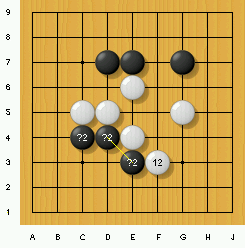
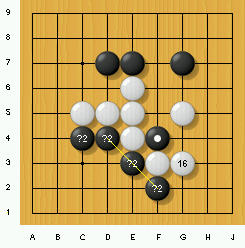
Above figure: White move #12 at F3. After the white move, MadLab marks the black blocks at E3 and C4 with the labels '?2' (and connects them with a yellow line), indicating that the program has found a double-threat tesuji involving these two blocks. In the field to the right of the board, MadLab gives some information on the tesuji (White plays D3 to capture one of the two blocks, and the lambda-order is n=2). If you want to have this tesuji demonstrated, you can simply right-click on one of the black stones and choose 'Capture 1 of 2...'. You should note that the marks do not depend on which player is actually to move in the position. The fact that the black stones are marked simply means that they are vulnerable if White were to move next, no matter whether this is actually so or not.
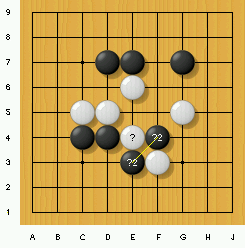
E3 or F4 capturable by W E5
(n=2) Above figure: Black move #13 at F4. After Black's move at F4, the above-mentioned tesuji does not work anymore. However, White has a new double-threat tesuji: namely the capture of either E3 or F4 (this tesuji starts with White connecting at E5). Note also that the white stone at E4 can be captured: this is indicated by the '?' mark.
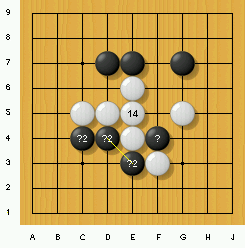
F4 capturable by W G4 (n=1) E3 or C4 capturable by W D3
(n=2) Above figure: White move #14 at E5. After White connects at E5, the double-threat tesuji involving the two black blocks at E3 and C4 is reactivated. In addition, Black F4 can now be captured directly (as a single-threat tesuji, starting for instance with White G4).
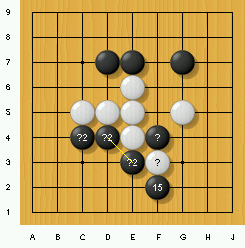
F4 capturable by W G3 (n=2) E3 or C4 capturable by W D3
(n=2) Above figure: Black move #15 at F2. This move threatens the white stone at F3, whereas the black stones at E3 and C4 are still vulnerable. The only way to capture black F4 is now for white to play G3 (which is what happens below).
F2 or E3 capturable by W E2 (n=1) E3 or C4 capturable by W D3 (n=2) F2 or C4 capturable by W E2
(n=2) Above figure: White move #16 at G3. After this move, the black stone at F4 is dead, which is marked by a white circle (meaning that the intersection can be considered white territory). This means that even if Black moves first and tries to save the stone, White can still capture it. Note also that there is now a double-threat tesuji involving the black stones at F2 and E3. In addition there is a double-threat tesuji involving F2 and C4, so all in all there are three double-threat tesuji's regarding these three black blocks. This cannot be seen from the diagram, since the yellow lines overlap, but it is shown in the text to the right of the board. The precision of the analysis depends upon the analyze-options given. The more nodes per analyzed goal MadLab is given, the more the program may see. You may also restrict the maximal lambda-order for normal and double-threat tesuji's. Limiting the maximal lambda-order for double-threat tesuji's to 2 may overlook some tesuji's, but it speeds up the analysis a great deal. Recommended parameters for relatively fast analysis is 50.000 nodes per goal, and max lambda-order 3 for normal tesuji's and 2 for double-threat tesuji's. Analyze guarantees that all tesuji's within the given parameters are seen (for double-threat tesuji's this is guaranteed no matter how far away from each other the two considered blocks of stones might be). If the game contains variations, you may ask MadLab to analyze these as well (alternatively they are ignored). |
 . You are asked about the board size:
choose 9, and a 9x9 board opens up. Now click the "Add black or white
stone(s)" button
. You are asked about the board size:
choose 9, and a 9x9 board opens up. Now click the "Add black or white
stone(s)" button  .
The cursor is transformed to a cross-hair pointer, and you may add stones
on the board by clicking once (black) or twice (white) -- clicking once
more removes the stone. Try entering the following position:
.
The cursor is transformed to a cross-hair pointer, and you may add stones
on the board by clicking once (black) or twice (white) -- clicking once
more removes the stone. Try entering the following position: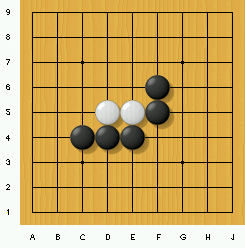
 button). After this, you hit the
"Search: Obtain goal" button
button). After this, you hit the
"Search: Obtain goal" button  , and MadLab answers at D7. The plus
sign in the button indicates that the program is asked
to obtain the goal when you press it. (Note also the
black stone in the magnifying glass, to remind you that clicking the
button asks for a black move.)
, and MadLab answers at D7. The plus
sign in the button indicates that the program is asked
to obtain the goal when you press it. (Note also the
black stone in the magnifying glass, to remind you that clicking the
button asks for a black move.) , until there
are none left to delete. Now click the "Set search goal(s)" button
, until there
are none left to delete. Now click the "Set search goal(s)" button
 (the small down-arrow button
 button). This pops up a window
showing you how the goal is set. This should look ok, and you now hit
the the "Search: Avoid goal" button
button). This pops up a window
showing you how the goal is set. This should look ok, and you now hit
the the "Search: Avoid goal" button  . This forces MadLab to play what it
considers the best escaping move up to now (probably White C6,
depending on how much time the program was given).
. This forces MadLab to play what it
considers the best escaping move up to now (probably White C6,
depending on how much time the program was given).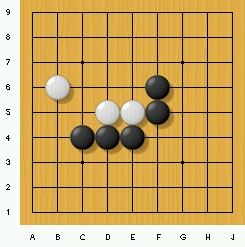
 or
or
 button all
the time to see the computer's answer. To avoid this, you can have
the computer launch a new search automatically whenever you play a
stone. Set this in the menu "Options" --> "Play Mode".
button all
the time to see the computer's answer. To avoid this, you can have
the computer launch a new search automatically whenever you play a
stone. Set this in the menu "Options" --> "Play Mode". to have the
answer displayed. Note that there may be more than one solution to
the problem, but in any case MadLab guarantees that the solution it
has found works. It may not be the simplest or most
efficient solution, however.
to have the
answer displayed. Note that there may be more than one solution to
the problem, but in any case MadLab guarantees that the solution it
has found works. It may not be the simplest or most
efficient solution, however. button.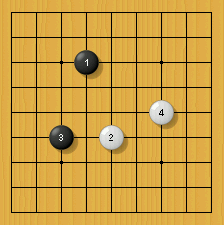
 ).
).