|
On this page, you will find
development versions, i.e. versions with an uneven number after the
first period (e.g. 2.1.x) -- alternatively take a look at the stable versions. You
should note that these development versions are experimental in the sense that they
have not been tested nearly as much as the stable versions. So please use
these versions with caution. (ADAM users:
please note that these versions are not officially endorsed by the
developers of the ADAM model).
In order to install, first close Gekko. Then uninstall your
existing Gekko
version (Control panel
--> Programs and features --> Uninstall a program). Finally,
download and run the installer
file
(InstallerForGekko.msi). Problems: see the problem-shooting guide.
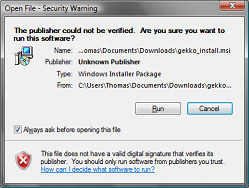
During installation, you can
safely ignore this warning if it appears:
- Version 1.21.20 (Gekko 2.0 Gamma 10) -- 10/2
2016
- This is a tenth gamma version!
- Installer file (please
close Gekko before installation!)
- Setup file (only relevant
if you have problems with the installer file)
- Zip-file (for manual installation -- experts
only!)
- Change-log (detailed list of changes)
- New
command COUNT (similar to INDEX). Flowchart (recursive) visualization
of DECOMP effects is now possible, try opening DECOMP and choose a
'Decomp' option (after this, you can right-click a time period). This
module is experimental. In addition some buts have been fixed. The
official 2.0 version is approaching.
- Version 1.21.19 (Gekko 2.0 Gamma 9) -- 8/2
2016
- This is a ninth gamma version!
- Installer file (please
close Gekko before installation!)
- Setup file (only relevant
if you have problems with the installer file)
- Zip-file (for manual installation -- experts
only!)
- Change-log (detailed list of changes)
- Mostly minor bugfixes and some user interface changes.
- Version 1.21.18 (Gekko 2.0 Gamma 8) -- 5/2
2016
- This is a eight gamma version!
- Installer file (please
close Gekko before installation!)
- Setup file (only relevant
if you have problems with the installer file)
- Zip-file (for manual installation -- experts
only!)
- Change-log (detailed list of changes)
- Change
of extension names. So 'gek' is now 'gcm' (command files), 'tsdx' is
now 'gbk' (databank files), and 'tab' is now 'gtb' (table defintion
files). Modes (MODE command) have gotten individual colors in the input
section on the main interface: green for sim, blue for data, and yellow
for mixed. Gekko starts out green, since sim-mode is default.
- Version 1.21.17 (Gekko 2.0 Gamma 7) -- 3/2
2016
- This is a seventh gamma version!
- Installer file (please
close Gekko before installation!)
- Setup file (only relevant
if you have problems with the installer file)
- Zip-file (for manual installation -- experts
only!)
- Change-log (detailed list of changes)
- New ACCEPT and ANALYZE commands. Preliminary version of printcode-clicking on tables. In addition some bugfixes.
- Version 1.21.16 (Gekko 2.0 Gamma 6) -- 28/1
2016
- This is a sixth gamma version!
- Installer file (please
close Gekko before installation!)
- Setup file (only relevant
if you have problems with the installer file)
- Zip-file (for manual installation -- experts
only!)
- Change-log (detailed list of changes)
- Mostly TRANSLATE improvements regarding the AREMOS translator, cf.
the change-log. In addition, some smaller bugfixes related to menus and tables.
- Version 1.21.15 (Gekko 2.0 Gamma 5) -- 25/1
2016
- This is a fifth gamma version!
- Installer file (please
close Gekko before installation!)
- Setup file (only relevant
if you have problems with the installer file)
- Zip-file (for manual installation -- experts
only!)
- Change-log (detailed list of changes)
- Mostly TRANSLATE improvements, cf.
the change-log. For timeseries, there is a new iif() function for intra-period conditions.
- Version 1.21.14 (Gekko 2.0 Gamma 4) -- 22/1
2016
- This is a fourth gamma version!
- Installer file (please
close Gekko before installation!)
- Setup file (only relevant
if you have problems with the installer file)
- Zip-file (for manual installation -- experts
only!)
- Change-log (detailed list of changes)
- This
is primarly a bug-fix version related to quarters and months. Still,
there is a new PRT<collapse> option for quarters and months, cf.
the change-log.
- Version 1.21.13 (Gekko 2.0 Gamma 3) -- 18/1
2016
- This is a third gamma version!
- Installer file (please
close Gekko before installation!)
- Setup file (only relevant
if you have problems with the installer file)
- Zip-file (for manual installation -- experts
only!)
- Change-log (detailed list of changes)
- Primarily,
the databank logic has been altered somewhat, so that the 'other'
databank (other than the primary Work databank) is now called the
'reference' databank rather than the 'secondary' databank. So for
instance, please use READ<ref> instead of READ<sec>. Else,
importing cell-wise from Excel can now be done with
SHEET<import>, and you can export to gnuplot with
EXPORT<gnuplot>. Apart from that, some bugs have been fixed. See
the change-log.
- Version 1.21.12 (Gekko 2.0 Gamma 2) -- 11/1
2016
- This is a second gamma version!
- Installer file (please
close Gekko before installation!)
- Setup file (only relevant
if you have problems with the installer file)
- Zip-file (for manual installation -- experts
only!)
- Change-log (detailed list of changes)
- A lot of improvements to make the 2.0 version more smooth around the edges. See the change-log!
- Version 1.21.11 (Gekko 2.0 Gamma 1) -- 14/12
2015
- This is a first gamma version!
- Installer file (please
close Gekko before installation!)
- Setup file (only relevant
if you have problems with the installer file)
- Zip-file (for manual installation -- experts
only!)
- Change-log (detailed list of changes)
- New
modules: R-interface (R_RUN), seasonal adjustment (X12A), and automatic
translators from Gekko 1.8 or AREMOS to Gekko 2.0 syntax. A gamma
version is a so-called release candidate, cf. the change-log.
- Version 1.21.10 (Gekko 2.0 Beta 8) -- 20/11
2015
- Installer file (please
close Gekko before installation!)
- Setup file (only relevant
if you have problems with the installer file)
- Zip-file (for manual installation -- experts
only!)
- Change-log (detailed list of changes)
- VERY
close to an official Gekko 2.0. This version introduces IMPORT/EXPORT,
and READ ... TO, in addition to some logic changes regarding ENDO/EXO
and UNFIX (you must use SIM<fix> to attain goals). See details in
the change-log! The help files have been updated.
- Version 1.21.9 (Gekko 2.0 Beta 7) -- 4/11
2015
- Installer file (please
close Gekko before installation!)
- Setup file (only relevant
if you have problems with the installer file)
- Zip-file (for manual installation -- experts
only!)
- Change-log (detailed list of changes)
- Primarily
a bugfix version: quite a lot of issues etc. have been fixed, cf. the
change-log. The official Gekko 2.0 is approaching. The last major
issues are now how to deal with the READ and OPEN commands, and
wheather or not they can be merged. Another issue is READ versus
IMPORT, and WRITE versus EXPORT. When these syntactical questions have
been sorted out, an official Gekko 2.0 is close.
- Version 1.21.8 (Gekko 2.0 Beta 6) -- 20/10
2015
- Installer file (please
close Gekko before installation!)
- Setup file (only relevant
if you have problems with the installer file)
- Zip-file (for manual installation -- experts
only!)
- Change-log (detailed list of changes)
- New
and more robust algorithm regarding forward-looking models (that is,
models with endogenous variables that contain leads). The algorithm is
called Newton-Fair-Taylor, or 'nfair', and has the same solving
capabilities as a so-called stacked time solver. The new solver can be
switched on by means of "OPTION solve forward method nfair;". Please consult the changelog for more info -- the solver is still being refined and is not yet documented in the help files.
- Version 1.21.7 (Gekko 2.0 Beta 5) -- 27/8
2015
- Installer file (please
close Gekko before installation!)
- Setup file (only relevant
if you have problems with the installer file)
- Zip-file (for manual installation -- experts
only!)
- Change-log (detailed list of changes)
- Matrix
functionality implemented, including construction,
addition, multiplication, inversion, etc. etc. Please consult the changelog
regarding the capabilities, and also take a look in the help system
regarding the MATRIX command (and the Gekko functions page, under
'Matrix functions').
- Version 1.21.6 (Gekko 2.0 Beta 4) -- 8/7
2015
- Installer file (please
close Gekko before installation!)
- Setup file (only relevant
if you have problems with the installer file)
- Zip-file (for manual installation -- experts
only!)
- Change-log (detailed list of changes)
- The version implements GOTO and LABEL, cf. the help files. Some minor bugs related to .tsd files and non-annual data were fixed.
- Version 1.21.5 (Gekko 2.0 Beta 3) -- 1/7
2015
- Installer file (please
close Gekko before installation!)
- Setup file (only relevant
if you have problems with the installer file)
- Zip-file (for manual installation -- experts
only!)
- Change-log (detailed list of changes)
- This
version implements READ<prn> and WRITE<prn>. Additionally,
it offers a LIST<direct> definition, if you have a long list
containing integers, or name parts starting with a number.
LIST<direct> does not try to interpret the items, but 'swallows'
them up raw.
- Version 1.21.4 (Gekko 2.0 Beta 2) -- 27/5
2015
- Installer file (please
close Gekko before installation!)
- Setup file (only relevant
if you have problems with the installer file)
- Zip-file (for manual installation -- experts
only!)
- Change-log (detailed list of changes)
- This
is a beta version with some changes corresponding to the newest syntax
blueprint (see the help files, under "Gekko 2.0 syntax blueprint").
Regarding the use of this version, please see the comments regarding
version 1.21.3 below.
- Version 1.21.3 (Gekko 2.0 Beta 1) -- 4/12
2014
- Installer file (please
close Gekko before installation!)
- Setup file (only relevant
if you have problems with the installer file)
- Zip-file (for manual installation -- experts
only!)
- Change-log (detailed list of changes)
- Gekko
2.0 is now stable enough to release as a beta version (the first one in an expected line of
beta versions). So you may use this version for testing etc., but please do not use it for anything serious yet.
For simulation purposes, it is perhaps better to still stick to the 1.8
version, and regarding data revision programs (command files), it is
probably best to use 2.0 beta 1 for new programs that you write from
scratch. Regarding existing data revision programs, for instance from
AREMOS, a semi-automatic translator is planned. The changes in Gekko
2.0 beta 1 relative to Gekko 1.8 are substantial, since most of the
parsing code has been rewritten. So in that sense, Gekko 2.0 beta 1 can
be regarded as a patient still recovering from heavy surgery. This is
another way of saying that bugs are to be expected.
- There
are many bugfixes and improvements, see the above-mentioned change-log
regarding the changes. Most significant relative to version 1.21.2 are probably databank handling à
la AREMOS with OPEN<prim>, optional databank searching etc. Note
that isstart.cmd does not work anymore (use gekko.ini), and that
command files are now expected with extension .gek (and not .cmd). Note
also that CLEAR is now RESTART, and CLEAR<all> is now RESET.
- Version 1.21.2 (Gekko 2.0 Alpha) -- 22/9
2014
- Installer file (please
close Gekko before installation!)
- Setup file (only relevant
if you have problems with the installer file)
- Zip-file (for manual installation -- experts
only!)
- Change-log (detailed list of changes)
- This is the first officially released version in the 2.0 series. The present version is an alpha version,
that is, even more unstable than a beta version. The idea is to offer
this release for download and inspection, while work is in progress
regarding an official Gekko 2.0 beta version. After the beta version
has been tested for a while, the stable Gekko 2.0 will be released.
- This version has a lot
of new capabilities, but there are still quite a few areas where old
commands simply do not yet work (and may fail without any meaningful
error messages). The reason is that the parser/translator has been
rewritten, and some of the old commands still need to be rewired to the
new Gekko 'engine'. So you may use this version for testing etc., but please do not use it for anything serious yet.
- Regarding new features etc., please see the updated help files here,
under 'Introduction' --> 'New features'. There is also a section on
syntax changes ('Gekko syntax basics'). The help file is also available
from within Gekko (F1 button). Right now old command files regarding
Gekko 1.8 will need some changes to run in this version. An automatic
converter of old command files is in progress!
- Version 1.7.5 -- 22/10
2013
- Installer file (please
close Gekko before installation!)
- Setup file (only relevant
if you have problems with the installer file)
- Zip-file (for manual installation -- experts
only!)
- Change-log (detailed list of changes)
- This
version leads up to the 1.8 release. It contains a number of smaller
fixes (see the change-log). Notable changes is the possibility to read
.prn files (CONVERTPRN), and use listfiles for lists: "LIST mylist =
#(listfile myfile)". You may now set the zoom level for the main Gekko
window (OPTION interface zoom).
- Version 1.7.4 -- 9/10
2013
- Installer file (please
close Gekko before installation!)
- Setup file (only relevant
if you have problems with the installer file)
- Zip-file (for manual installation -- experts
only!)
- Change-log (detailed list of changes)
- You
may use "PPLOT<a> fY" to plot the variable fY from both the Work
and Base databanks (in the same graph). Codes <ap> and <ad>
are also possible. The 'a' could be read as 'all banks' (or more
precisely Work and Base), and line points may be omitted by means of: OPTION graph lines points = no. In addition, some finetuning of column widths
in html tables has been implemented, cf. the change-log.
- Version 1.7.3 -- 3/9
2013
- Installer file (please
close Gekko before installation!)
- Setup file (only relevant
if you have problems with the installer file)
- Zip-file (for manual installation -- experts
only!)
- Change-log (detailed list of changes)
- Only
minor changes in this version. Some improvements in tables (you can put
vertical borders between particular periods), and PPLOT can now export
the graph in .png or .svg format (besides .emf format).
- Version 1.7.2 -- 11/4
2013
- Installer file (please
close Gekko before installation!
- Setup file (only relevant
if you have problems with the installer file)
- Zip-file (for manual installation -- experts
only!)
- Change-log (detailed list of changes)
- This version implements direct reading from Excel (before only csv files could be read), and a new type of frequency.
- Introduced
fixed parameters in the model (.frm) file. You may use for instance
"FRML _i y = #c * x;" together with "VAL c = 0.82;" (the latter
should be included somewhere in the .frm file).
- You
may use READ<xls> or READ<xlsx> to read timeseries directly
from an Excel file. As of now, the first sheet will be read, and the
first row should be dates, whereas the first column should be variable
names. Use READ<xlsx cols> if you need that inversed/transposed.
Also works for MULBK and OPEN.
- A
new frequency 'undated' is introduced: use "OPTION freq u". Works much
like annual, and you may for instance set "TIME 1 100" to get 100
undated observations (or "TIME 0 99" if you prefer).
- Version 1.7.1 -- 2/4
2013
- Installer file (please
close Gekko before installation!)
- Setup file (only relevant
if you have problems with the installer file)
- Zip-file (for manual installation -- experts
only!)
- Change-log (detailed list of changes)
- Addition
of a HP-filter function. You may use "GENR <2000 2010> xxgdp_hp =
hpfilter(gdp, 6.25)", where the last argument is the lambda
parameter (recommended values for lambda are 6.25 for annual series,
1600 for quarterly series, and 129600 for monthly series). You may
include an additional argument (0 or 1), indicating whether the
internal calculation should be performed on log-transformed input (and
exp-transformed as output). This option makes sense for instance on a
growth variable like GDP, but is problematic on variables that may
become close to 0 or negative. So the safer non-transformed calculation
is used as default.
- Version 1.5.12 -- 5/2
2013
- Installer file (please
close Gekko before installation!)
- Setup file (only relevant
if you have problems with the installer file)
- Zip-file (for manual installation -- experts
only!)
- Change-log (detailed list of changes)
- The help files have been updated and redesigned. In addition, a number of smaller bugfixes.
- Version 1.5.11 -- 21/1
2013
- Installer file (please
close Gekko before installation!)
- Setup file (only relevant
if you have problems with the installer file)
- Zip-file (for manual installation -- experts
only!)
- Change-log (detailed list of changes)
- Bug:
There is a bug in this version (when you type '<' for instance).
Please set "OPTION interface suggestions = none" (the bug will be
corrected in the next version).
- A large number
of changes in anticipation of a forthcoming stable version 1.6. After
this version, it is the hope that mostly minor changes will be
necessary until 1.6. So this version is good for stability
testing of the future version 1.6. See the changelog for details about
the changes, but highlights are the following:
- Equation
reordering is switched off as default for the Gauss solving method.
Please note this if you SIM suddenly fails where it did not before.
- Default
databank format is now .tsdx (formerly it was .tsd). If you still need
to read some .tsd files, please use "READ<tsd>mybank" instead of
"READ mybank" to indicate the file type explicitly.
- When
swapping databanks in the F2 window, Gekko now enters 'swap-mode' where
only viewing of data is possible. Use UNSWAP to swap back.
- Suggestions are provided in the user interface regarding option settings (and local options in the < > field).
- Recordring of user commands. See menu 'Edit' --> 'Command history...'.
- FOR loop improvements (you can now loop over VALs and DATEs too).
- IF statement improved to allow OR, AND and NOT, and with comparinsons '<',
'<=', '==',
'>=', '>', '<>'. You can compare strings, values or dates.
- UNFIX command replaces CLEARGOALS and GAUSS commands for a more logical way to handle goals setting and removing.
- READ<csv> is now possible, so both reading and writing csv should be ok now.
- Laspeyres
chain index function: GENR (p,x) = laspchain(#p,#x, 2005), where #p is
a list of prices and #x is a list of quantities (and 2005 the index
period). Use laspfixed() for fixed-prices formula.
- Bulk updating or closing of PPLOT or UDVALG windows. See the 'Window' menu.
- Copy button
in the user interface. Copies the cells of the last issued PRT/MULPRT
statement, and puts them on the clipboard for pasting into a
spreadsheet like Excel.
- Change of ini file name (use gekko.ini instead of isstart.cmd).
- GMULPRT rename to MULPRT<v>.
- NOTE: The helpfiles have not been updated yet, but are in the process of being revised.
- Version 1.5.10 -- 19/12
2012
- Installer file (please
close Gekko before installation!)
- Setup file (only relevant
if you have problems with the installer file)
- Zip-file (for manual installation -- experts
only!)
- Change-log (detailed list of changes)
- Quite
a large number of changes, all pointing towards a version 1.6. New run
status window, to keep track of larger jobs. TIMEFILTER command is
changed to allow for easier syntax, and it also has an 'avg' option
that integrates with the PRT command yielding in effect a better VPRT
command (VPRT will be phased out). TELL command (replacing DISPLAY),
and PIPE can pipe to html files too (practical when exporting tables in
html). Model blocks are supported, at the moment this info is shown
when using DISP, or performing residual check (where the residuals can
be split into model blocks too). UPDX and UPD have merged (UPDX will be
phased out).
- Version 1.5.9 -- 22/11
2012
- Installer file (please
close Gekko before installation!)
- Setup file (only relevant
if you have problems with the installer file)
- Zip-file (for manual installation -- experts
only!)
- Change-log
(detailed list
of changes)
- This
version merges the PRTX and PRT commands, and adds easy-to-remember
display codes like 'lev', 'abs', 'dif', 'pch' and 'gdif'. Together with
global options to control these 'longer' display codes, this makes it
possible to control the default output of PRT and MULPRT to a
large extent. PRTX is removed, as is also PCTPRT and MULPCT (please use
PRT<pch> and MULPRT<pch> instead). In addition to this,
multiple display codes inside the same <>-field are now allowed.
- Version 1.5.8 -- 13/11
2012
- Installer file (please
close Gekko before installation!)
- Setup file (only relevant
if you have problems with the installer file)
- Zip-file (for manual installation -- experts
only!)
- Change-log
(detailed list
of changes)
- Beware
that the changes in this version are pretty profound, so please use the
version with some care. First
and foremost, version 1.5.8 introduces faster loading of models
and
databanks. In addition, model signatures are introduced.
- After being
loaded with the MODEL command, the parsed model is now kept as a cache
file on the users hard disk, so that it can be loaded much faster next
time. The cache files operate behind the scenes, and imply that a known
model loads 8 times faster than before. (Note that the first time a model is loaded with
the MODEL command there is no speedup).
- Databank
files in .tsdx format (READ<tsdx> and WRITE<tsdx>) are now
using a binary format that loads 3 times faster than older .tsdx files.
Gekko still reads the older .tsdx files (version 1.0), but will write
.tsdx files in the newer binary format (version 1.1). This means that
Gekko versions prior to 1.5.8 cannot read a .tsdx databank written by
1.5.8 (unless "OPTION databank file tsdx version = 1.0" is set
before writing from Gekko 1.5.8). The old and new .tsdx format contains
exactly the same information, and is still double-precision (15
significant digits).
- The above
speed improvements imply faster Gekko startup (if Gekko is started up
with an isstart.cmd file loading a model and databank), and faster
CLOSEALL command.
- Model
signatures are
introduced, together with the SIGN command. You may use the SIGN
command to get a signature for your model, and insert this signature
into the .frm file. Signatures skip blank lines and comments, and keep
track of whether a model has been changed relative to an
official/original version.
- Version 1.5.7 -- 2/10
2012
- Installer file (please
close Gekko before installation!)
- Setup file (only relevant
if you have problems with the installer file)
- Zip-file (for manual installation -- experts
only!)
- Change-log
(detailed list
of changes)
- BUG: Beware
that this version has problems printing and plotting variables with
quarterly or monthly frequency. This is fixed in version 1.5.8.
- There are quite
a lot of changes, please consult the change-log for more details.
- Forward-looking
models can be solved.
- Tables can be printed in HTML format
(TABLE<html>).
- TIMEFILTER
command to make printing and tables more readable.
- OPEN command
and F2 window for swapping databanks. Any number of databanks can be
opened, and timeseries can be referenced in an open databank by means
of 'databank:timeseries' (that is, with colon). Databanks can be opened
with alias name (AS), and there is also a CLOSE command.
- COLLAPSE
command for converting higher-frequency (for instance monthly) to
lower-frequency (for instance quarterly).
- UDVALG window
has frozen (non-scrolling) headers regarding variable names and time
periods. Also, variables are now clickable/browsable.
- New help
system, using chm format. Much easier to search etc., and the content
is updated.
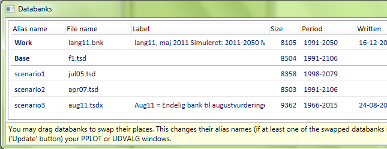
- F2 window
(open databanks) looks like this:
- Version 1.5.6 -- 15/8
2012
- Installer file (please
close Gekko before installation!)
- Setup file (only relevant
if you have problems with the installer file)
- Zip-file (for manual installation -- experts
only!)
- Change-log
(detailed list
of changes)
- Very minor
changes: fixed at bug that meant that an expression like
"@variable(-1)" could not be parsed.
- Version 1.5.5 -- 23/7
2012
- Installer file (please
close Gekko before installation!)
- Setup file (only relevant
if you have problems with the installer file)
- Zip-file (for manual installation -- experts
only!)
- Change-log
(detailed list
of changes)
- Very minor
changes:
- Introduced
command TRIMVARS.
This command removes all non-model variables from the Work and Base
databanks.
The command is handy if the databank contains a lot of superflous or
irrelevant variables that are not part of the model.
- Opening up
the possibility of
running tables written in C#. This will not be supported in the long
run, but until then, the old C# tables can be called with TABLEOLD
instead of TABLE (please use TABLE if possible).
- Version 1.5.4 -- 4/7
2012
- Installer file (please
close Gekko before installation!)
- Setup file (only relevant
if you have problems with the installer file)
- Zip-file (for manual installation -- experts
only!)
- Change-log
(detailed list
of changes)
- First and
foremost, this version performs simulations much faster (both Gauss and
Newton algorithm). But there are also quite a lot of other changes.
Some of the more important changes are listed below (for a more
detailed list of changes, please consult the change-log: see the link
abolve).
- Sadly, the help
files have still not been updated.
This has to do with the fact that they are in the process of being
translated from the old .rtf format to a more modern XML/HTML
implemention. (Which will also mean that a more standard searchable
help system will appear soon).
- Faster
simulation, both for Gauss and Newton algorithm (and individual
years/periods are no longer shown as default while simulating).
- Improved
error-reporting. When Gekko crashes, you may click a link for more
information. And when Newton simulations crashes, Gekko may pack an
error report with model, databank etc. When simulation crashes, you can
now click a link to return to pre-simulation values.
- DISP can search in labels: try DISP 'import'.
- Target
icon is shown (next to red/yellow/green traffic lights), if EXO/ENDO
goals are active. You can also have Gekko automatically switch back to
Gauss after EXO/ENDO simulation (OPTION solve gauss goal switchback).
- Command GAUSS sets solving algorithm to Gauss (and
clears any EXO/ENDO goals)
- Command CLEARGOALS clears any EXO/ENDO goals.
- You can use "OPTION folder pipe" to direct PIPE output
to specific folder.
- Version 1.5.3 -- 2/5
2012
- Installer file (please
close Gekko before installation!)
- Setup file (only relevant
if you have problems with the installer file)
- Zip-file (for manual installation -- experts
only!)
- This
version contains a number of things, but sadly the help files still lag
behind. This will be corrected soon, as an official version 1.6 is
planned later this month. So due to the non-updated help files, version
1.5.3 is mostly for users actively
involved in the development of Gekko. Changes:
- There
is now
a 'Menu' tab, where html menus can be browsed. These file and folder
regarding these html menus can be set by means of for instance "OPTION
folder table = \menu"
and "OPTION table startfile = menu.html".
- READ/MULBK/WRITE
now work with <tsd> or <tsdx> option.
- DISP
only shows 5 lines of data as default (see "OPTION print disp
maxlines"). This makes it easier to use DISP as an equation browser.
- There is a
PRTX command, capable of for instance row-wise print ("PRTX
<rows>"), and element-specific printcodes: ("PRT fy
fy<p>"). It can also set decimals etc. -- more on that in the
documentation for version 1.6.
- PCIM
converters: there are now two converters: a converter for tables, and a
converter for menu files. See 'Utilities' --> 'Converters' -->
'PCIM converters'.
- There is also
a table-filler, see 'Utilities' --> 'Converters'
--> 'Convert tables to text'. This utility converts a system of menu
and table files to a corresponding system of files suitable for the
intra- or internet. Essentially, the system just fills the tables with
data, given a databank and time period.
- Version 1.5.2 -- 13/4
2012
- Installer file (please
close Gekko before installation!)
- Setup file (only relevant
if you have problems with the installer file)
- Zip-file (for manual installation -- experts
only!)
- This
version implements a converter that converts tables (*.tab files) in
PCIM format to tables in the new XML format (unfortunately, the help
file regarding the Gekko TABLE command is still missing: version 1.5.3
will come with an extensive help file exlaining tables in Gekko). The
converter is not perfect, but converts most simple PCIM tables. See the
menu 'Utilities' --> 'Converters' --> 'Convert PCIM tables...'.
- Version 1.5.1 -- 3/4
2012
- Installer file (please
close Gekko before installation!)
- Setup file (only relevant
if you have problems with the installer file)
- Zip-file (for manual installation -- experts
only!)
- There are quite
a lot of changes relative to version 1.4. A brief list of changes is
the following:
- Reads even
older PCIM banks.
- Tables can
now be done either by means of XML table definitions, or by means of
more matrix-like code.
- Working
folder can be set like this: "OPTION folder working = c:\adam\2010".
- Gekko.exe can
be called with parameters setting working folder and whether the ini
file (isstart.cmd)
should
be loaded. For instance: "gekko.exe -folder:c:\adam\2010 -noini".
- CPLOT
command. Works like WPLOT, but just copies the data into the clipboard,
for pasting by means of Ctrl-V.
- PPLOT willl
accept title and heading: "PPLOT var1 var2 title='Scenario1'
heading='Trade'". The title will show up as the Windows window name.
- WPLOT also
accepts heading, and a stamp may be set: "WPLOT var1 var2 heading='Trade'
stamp=yes".
- Gekko now
reads and writes ANSI text files, so issues with æøå etc. should be
eliminated.
- Version 1.3.18 -- 18/10
2011
- Installer file (please
close Gekko before installation!)
- Setup file (only relevant
if you have problems with the installer file)
- Some
minor fixes. (a): Loops over predefined lists are now working in
command files ("FOR i=#mylist; PRT #i; END;"). (b) When frequency mode
is quarterly or annual, integers are accepted as time period (in that
case, all quarters/months in the given years get covered). (c): PPLOT
can write silently to a file, e.g. "PPLOT fY fX file=graph1" (the
resulting file will be graph1.emf). (d): If 'option folder' is 'yes',
and 'option folder bank' is given some value, the WRITE command will
write the databank file to that particular folder (and try to read
databanks from that folder also, by the way).
- Version 1.3.17 -- 10/10
2011
- Installer file (please
close Gekko before installation!)
- Setup file (only relevant
if you have problems with the installer file)
- New
memory variable introduced: VAL. Syntax is "VAL factor = 2.5; VAL
factor2 = 2*#factor". VAL-variables can be used in GENR, PRT/PPLOT
etc., and UPD. Regarding UPD, a new UPD-variant has been created. This
variant accepts expressions and VAL-variables as arguments, but it's
elements must be delimited by commas. Example: "UPDX tg * 1.0, #factor,
#factor2, #factor2/#factor;". In the example, the time period
spans 4 periods. VAL-variables may also be used like this: "GENR tg =
tg * #factor", or "PRT #factor #factor*tg".
- Version 1.3.16 -- 6/10
2011
- Installer file (please
close Gekko before installation!)
- Setup file (only relevant
if you have problems with the installer file)
- The version fixes a bug related to FOR
loops. Successive FOR loops failed (whereas nested FOR loops were ok).
- Version 1.3.15 -- 30/9
2011
- Installer file (please
close Gekko before installation!)
- Setup file (only relevant
if you have problems with the installer file)
- The
version has an augmented residual check capability: when choosing
"Utilities" --> "Check residuals...", you may now choose "Show dlog
residuals". If so, an extra column is added to the output,
corresponding to the (log-)residuals in a log-linear equation. This
output is often easier to compare against output from estimation
software (if the equation is log-linear).
- Version 1.3.14 -- 27/9
2011
- Installer file (please
close Gekko before installation!)
- Setup file (only relevant
if you have problems with the installer file)
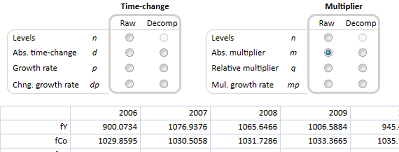
- This version introduces a
real decomposition window, see screenshot below (so-called UDVALG, will
be renamed at one
point...). You may open the window by means of "UDVALG fY" for example,
where fY is the variable. There are quite a few combinations to choose
from, but the main point is that you choose between time-decomposition
(from period to period) and multiplier-decomposition (from baseline to
work databank). Data are provided in an Excel-like sheet, where you can
copy-paste cells to Excel or others. This version also introduces new
print-codes (data transformations). The biggest change is that "m" now
means absolute multiplier, and "q" means relative multiplier (in %).
Before, these were called "md" and "mp", respectively. So in this
version, "mp" means multiplier differences in growth rates between
baseline and work banks (in previous versions it meant relative
multiplier). The documentation lags behind at the moment, but will soon
be updated. The Excel-like sheet in UDVALG will at some point also be
used for the TABLE command. Underneath the sheet is a table-object
which will later on be used for many purposes...
- Version 1.3.13 -- 1/9
2011
- Installer file (please
close Gekko before installation!)
- Setup file (only relevant
if you have problems with the installer file)
- New
command: FINDMISSINGDATA. This command finds variables with missing
values in the work databank. If a model is loaded, the output is split
into different lists (endogenous, exogenous etc.). You may indicate a
time period (otherwise it uses the global time setting), and you may
also indicate the list of variables that are to be checked. For
instance: "FINDMISSINGDATA <2008 2010>" looks for all variables
with missing values in the period 2008-2010. You may restrict it like
this: FINDMISSINGDATA
<2008 2010> #vars", where the list #vars contains the relevant
variables you want to check. Gekko outputs a number of lists: for
instance the list #missingdata contains all variables with missing data
in the work databank, whereas the lists #missingdata_all,
#missingdata_endo etc. are subsets of that list, and correspond to the
Gekko-defined lists #all, #endo etc. (i.e., all model variables, all
endogenous model variables, etc.).
- Version 1.3.12 -- 12/8
2011
- Installer file (please
close Gekko before installation!)
- Setup file (only relevant
if you have problems with the installer file)
- A very small bugfix: it was not
possible to use the variable name PCH (with capital letters) -- this is
fixed.
- Version 1.3.11 -- 10/8
2011
- Installer file (please
close Gekko before installation!)
- Setup file (only relevant
if you have problems with the installer file)
- Some bugfixes: in 1.3.10 the UDVALG
command was broken.
- Version 1.3.10 -- 9/8
2011
- Installer file (please
close Gekko before installation!)
- Setup file (only relevant
if you have problems with the installer file)
- The
version introduces wildcard lists. Wildcard lists are always inside
brackets [], but otherwise they behave just like ordinary lists
(#listname). So anywhere you can put a list, you can alternatively put
a wildcard-list. Inside the brackets, you may use '*' for arbitrary
character match (0 or more matches), or '?' for a single character
match. So for instance, [fX*] matches all variables beginning with "fX"
(including "fX" without any characters following), whereas [fX?]
matches variables starting with "fX" followed by a single character.
Wildcard lists tries to match variables in the Work databank. Examples:
- LIST
[fX?]. Shows the variables matching the pattern on the screen. This is
equivalent to the INDEX command in AREMOS (without listname given).
- LIST
list2 = [fX?]. Puts the matching variables into list #list2. This is
equivalent to the INDEX command in AREMOS (with listname given). You
may enter several arguments: "LIST list3 = [fX?] [fY*] Enl [Q*n?]".
(Using '=' syntax with lists will slowly replace the old "LIST +"
syntax).
- PRT [fY*2] fY*2. Prints all variables
matching the pattern 'fY*2',
followed by printing the mathematical expression fY*2.
- WRITE
[fX??] file=fxfile. Writes all variables starting with "fX" followed by
two characters to the file fxfile.tsd. (Actually "WRITE [*]
file=databank" is identical to "WRITE databank").
- DELETE [J*].
Deletes all variables beginning with 'J' from the Work databank.
- UPD <2010 2010> [J*] = 0. Sets all variables
beginning with 'J' to 0, for the given period.
- Version 1.3.9 -- 8/8
2011
- Installer file (please
close Gekko before installation!)
- Setup file (only relevant
if you have problems with the installer file)
- This
version is almost identical to 1.3.8 -- only change is the ability to
do write in TSP format ("WRITE <tsp>"). If no period is given,
all periods are writtten for each series. You may write a subset of
variables like this: WRITE <tsp> fY Enl tg file=tspfile.
- Version 1.3.8 -- 3/8
2011
- Installer file (please
close Gekko before installation!)
- Setup file (only relevant
if you have problems with the installer file)
- UDVALG
(decomposition) has been augmented, so that it also supports time
decomposition and printing of non-decomposed values. Codes for UDVALG
are in this stype: <d>, <md>, <xd>, <xmd>
meaning time differences (decomposed), multiplier differences
(decomposed), time differences (non-decomposed), and multiplier
differences (non-decomposed). Use <xn> for raw levels. In
addition, the STAMP and VERS commands have been implemented.
- Version 1.3.7 -- 2/8
2011
- Installer file (please
close Gekko before installation!)
- Setup file (only relevant
if you have problems with the installer file)
- Some
smaller fixes: table files can now do absolute differences, any missing
model variables are auto-created with READ or MULBK statement,
#-variables work in DISPLAY and HDG commands, PIPE <append>
implemented.
- Version 1.3.6 -- 15/7
2011
- Installer file (please
close Gekko before installation!)
- Setup file (only relevant
if you have problems with the installer file)
- More
work on tables, and some work on UDVALG. PUDVALG is now possible
(prints it in plain text), and option <p> can be used to get
multiplier contributions in percentages (adding up to 100).
- Version 1.3.5 -- 15/7
2011
- Installer file (please
close Gekko before installation!)
- Setup file (only relevant
if you have problems with the installer file)
- More
work on tables etc. Also in this version you may use simple additions
in the option field: PRT <#per1+2 #per2-1> fY", where #per1 and
#per2 are defined by the DATE command. Note: only '+' and '-' works,
and only one of these. It should be the time period first, and then '+'
or '-' some integer. These additions do not work outside the option
field. Parentheses may be used if desired for readability: "PRT <(#per1+2) (#per2-1)> fY".
- Version 1.3.4 -- 14/7
2011
- Installer file (please
close Gekko before installation!)
- Setup file (only relevant
if you have problems with the installer file)
- The version
contains more work on tables.
- Version 1.3.3 -- 14/7
2011
- Installer file (please
close Gekko before installation!)
- Setup file (only relevant
if you have problems with the installer file)
- This version
is mostly some bugfixes, and some more work on tables.
- Version 1.3.2 -- 13/7
2011
- Installer file (please
close Gekko before installation!)
- Setup file (only relevant
if you have problems with the installer file)
- BEWARE!: This
version implements some changes in the way READ works, if several READ
statements are used successively.
- In
this version,
READ does not merge per default. So if you read bank1, and afterwards
read bank2, only variables from bank2 will exist in the Work databank.
However, you can merge by means of "READ <merge> bank2" (or
regarding the Base databank: "MULBK <merge> bank2"). Note that
the READ command always puts the resulting Work databank (possibly
merged) into the Base databank (which is cleared first). So after any
READ statement (with or without merging), the Work and Base databanks
are always identical.
- There
is a possibility to clear the content of databanks without using
CLOSEALL. Please use "CLEAR work" or "CLEAR base", respectively.
- A
first version of an INDEX command is working, for example "INDEX 'fX*'
mylist". This will put any variables from the Work databank matching
the pattern into the list #mylist (the command can be used without
giving a listname). Please note the quotes (') around the pattern -- at
the moment these are mandatory, but later on this will be fixed. You
can use any number of '*' and '?' as wildcard characters.
- Version 1.3.1 -- 12/7
2011
- Installer file (please
close Gekko before installation!)
- Setup file (only relevant
if you have problems with the installer file)
- The
version implements a new databank format: tsdx files. These are really
just zipped tsd files, with a xml file containg metadata (heading
etc.). When using tsdx files, the precision is augmented from 9 to 15
significant digits. Even though there are more digits, the tsdx files
are typically smaller than the usual tsd files due to zipping. Please
use "option databank file format tsdx" to activate the use of tsdx
files (and to revert to tsd files: "option
databank file format tsd"). The HDG command is implemented, and the
databank heading will be used in any following WRITE commands (but can
only be saved into the file if it is a tsdx file).
- Version 1.0.53 -- 7/6
2011
- Version
has been patched a few times: last patch on 9/6 13:30. If you upgraded
to 1.0.53 before this time, please consider uninstalling Gekko, and
install 1.0.53
again.
- Installer file (please
close Gekko before installation!)
- Setup file (only relevant
if you have problems with the installer file)
- A
lot of small and medium size changes. Next is prettifying DISP command,
looking at error messages etc. Some of the changes may affect existing
programs, especially the first four changes!
- "OPTION
solve data init" has been changed, so that it now follows PCIM
terminology (yes/no has been reversed).
- ENDO
and EXO are now
non-cumulative. So the only use for ENDO or EXO without an argument
(for clearing) is when the user wishes to revert to normal simulation
after doing goals/means. "ENDO ?" or "ENDO ?" can be used to see whichs
goals/means are set.
- All
options are cleared with CLOSEALL command. But CLOSEALL now also
re-reads any isstart.cmd file, so options can be kept there and will
resurrect from that file (isstart.cmd works a bit like AREMOS'
aremos.opt). CLOSEALL is intended to be equivalent to closing and
restarting Gekko, so it seems fair enough to clear the options too. At
some point isstart.cmd will probably be renamed into gekko.opt, but not
right now. Please do not put a CLOSEALL statement inside the
isstart.cmd file -- this will trap Gekko in an infinite loop!
- When
reading a tsd file with the READ command, Gekko now always reads the
file into both work and baseline databank. Note that MULBK [filename]
only reads the file into the baseline databank. Gekko still merges
files, so you can read bank1, followed by reading bank2, and the result
will be a merged databank (with bank2 overwriting any observations
existing in both banks).
- DEFDIR
is implemented, see "OPTION folder ...".
- MULBK
*, STOP and SKIP are working.
- SYS is
working like AREMOS: for example: SYS 'copy file1.tsd file2.tsd'
- Work on
better line breaking, width is set in "OPTION print width"
- FOR
loops with lists work in command files. For instance: "FOR i = nm nk;
PRT fX#i; END;". Perhaps it will later on be necessary to enforce a
type indication ("FOR string i = ..."), but maybe it can be avoided.
- Alternative
list syntax: "LIST xx = nm nk". The old one still works of course:
"LIST + #xx nm nk". At some point commas between items will probably be
enforced, but not right now...
- Version 1.0.52 -- 30/5
2011
- Installer file (please
close Gekko before installation!)
- Setup file (only relevant
if you have problems with the installer file)
- Some
work on quarterly and monthly data. Gekko now seems to both read and
write tsd files with quarterly or monthly data ok (and interchange with
AREMOS). In addition, PPLOT now works for quarters and months. Labels
at the bottom are year and month, and for quarters the following months
are used: 1, 4, 7 and 10 (for q1, q2, q3 and q4). This has to do with
the way gnuplot handles dates -- quarters are not implemented. So the
x-axis is not optimal at the moment, but at least graphs are possible.
- Version 1.0.51 -- 29/5
2011
- Installer file (please
close Gekko before installation!)
- Setup file (only relevant
if you have problems with the installer file)
- Bug:
There was a problem with nested time functions, eg. "y = dif(dlog(x))".
This is now fixed, so that any level of nesting is allowed. Reading a
bank with quarterly timeseries also had a bug when frequence was not
set to annual -- also fixed. The DISP command now prints unfolded
equations with DJZ-type variables etc. (this output will be prettified
soon). You can now use Ctrl+M/O/H as shortcuts to the three tabs in the
user interface. Last but not least, reading of tsd files has been
changed. When reading, Gekko now first copies the .tsd file into a
local folder on the user's hard disk, hopefully improving reading tsd
files from at network drive (whether this 'caching' is done can be set
by means of "option databank file copylocal yes/no" -- default is yes).
- Version 1.0.50 -- 24/5
2011
- Installer file (please
close Gekko before installation!)
- Setup file (only relevant
if you have problems with the installer file)
- Bugfix:
MULBK without an argument had ceased working -- this is fixed. MULBK
(without an argument/bankname) works in the following way: (1) It
clears the
baseline databank, and (2) it copies all variables from work to
baseline databank. Result: the two databanks are identical. This is all
done in RAM, so no need to write and read a .tsd file. Example: "TIME
2010 2020; SIM; MULBK; UPD tg = 0.26; SIM; MULPRT fY;" So the MULBK
statement should be placed right after the baseline simulation (the
first SIM).
- Version 1.0.49 -- 23/5 2011
- Installer file (please
close Gekko before installation!)
- Setup file (only relevant
if you have problems with the installer file)
- DIFPRT
and NDIFPRT working now. These accept dates, lists of variables, and
can print to file (e.g. "DIFPRT <2000 2010> #endo file=dif.txt").
Limits: option databank compare tabs/trel. Also implemented
line-breaking in PRT, DIFPRT, NDIFPRT, so that multiple variables can
be printed nicely. Width: option print width/filewidth.
- Version 1.0.48 -- 19/5
2011
- Installer file (please
close Gekko before installation!)
- Setup file (only relevant
if you have problems with the installer file)
- This
version fixes a small bug: a command like "PRT fY(2010)" had ceased to
work. Also some work on error commands.
- Version 1.0.47 -- 13/5
2011
- Installer file (please
close Gekko before installation!)
- Setup file (only relevant
if you have problems with the installer file)
- This
version mostly fixes some bugs regarding the EFTER command. The EFTER
command runs equations after an 'AFTER$' statement in the model file
(i.e., typically table variables), and in addition runs all reverted
J-factors and Z-variables. It is tested that the EFTER command yields
the same results as PCIM now. The same does not hold regarding the RES
command. For some reason, in PCIM some J-variables are changed when
executing RES. This is not the case in Gekko: in Gekko the RES command
only changes endogenous variables (i.e. left-hand side variables in
FRML statements).
- Version 1.0.46 -- 1/5
2011
- Installer file (please
close Gekko before installation!)
- Setup file (only relevant
if you have problems with the installer file)
- Because of a
bug, this version has been patched
regarding the RES command.
- This
version should be reasonably
stable, but for serious purposes maybe stick to version 1.0.44 for a
little while longer. Assign-variables (memory-variables such as
strings, dates etc.) have
been implemented. At the moment only as a first step, but work will
proceed in that direction. As of now, you may define a string like
this: "STRING file='scenario4'" (note the quotes around the string).
This may later be referenced by means of either '#file' or '{#file}'
(or even just {file}). So you may write "READ #file" or "READ {#file}".
When not using the brackets, you may sometimes have to use the "glue"
symbol, for instance "PRT fX|#i|n|#j". If defined by "STRING i = 'm'"
and STRING j='qq'", this translates into "PRT fXmnqq". Without the
glue, Gekko would have looked for assign-variable '#in'. Note that "PRT
fX|#i|n|#j" can be written shorter as "PRT fX#i|n#j". This follows
AREMOS conventions, but may not be too easy to read. An alternative,
which is often easier to read, is using brackets: "PRT fX{#i}n{#j}".
Here it is easy to see where the variable and fixed parts are. It may
even be abbreviated into : "PRT fX{i}n{j}", omitting the hash signs
(#). In addition to the STRING command, there is also a DATE command.
For example "DATE per1=2010" and "DATE per2=2020". These can be used
like this: "TIME #per1 #per2", or "PRT<#per1 #per2> fY".
Regarding the PRT example, you cannot use assign-dates outside the
option brackets . Hence, "PRT
#per1 #per2 fY" will result in an
error. The reason this is not allowed is because it confuses the syntax
too much. Consider "PRT #x1 #x2 #x3". What does it mean? Is it two
dates #x1 and #x2, and one variable #x3? Is it three lists or three
assign-variables or a mixture? To avoid hard-to read code like that it
is mandatory to put assign-dates into the option brackets. (However,
using the option brackets for setting time is already best practice,
since changing global time in a non-TIME statement can result in
hard-to-read programs).
- Version 1.0.44 -- 20/4
2011
- Installer file (please
close Gekko before installation!)
- Setup file (only relevant
if you have problems with the installer file)
- Because of a
bug, this version has been patched
regarding the RES command (for the original installer file, see here).
- Work on (A) VPRT, (B) file
sharing/blocking, (C) tsd write. (A):
VPRT can be used together with the new command TIMESPAN. For instance:
"TIMESPAN 2011 2015, 2016 2020, 2021 2025; VPRT fY". The timespan can
also be put into the option field: "VPRT <2011
2015, 2016 2020, 2021 2025> fY. Note the commas separating each
sub-period. The periods can be overlapping, and expressions, lists etc.
are allowed as arguments. TIME and TIMESPAN do not synchronize
automatically. (B): Work on file sharing. In some cases users like to
run two or more instances of Gekko in the same folder (at the same
time). This Gekko version implements file waiting, i.e. if a file seems
blocked Gekko waits until it hopefully becomes unblocked later on. You
will be informed if Gekko is waiting for a file (either read or write
access, or file zipping), and Gekko will wait for a maximum of 10
minutes whereafter it will fail. Beware that sharing the working folder
between several Gekko's at the same time can in principle produce
unpredictable results (but in practice it will most often be ok). (C):
You can choose to have all variable names written in CAPS, for easier
use with AREMOS. Example: "WRITE <caps=yes> scenario" will write
to the file scenario.tsd, with all variable names in CAPS.
- Version 1.0.43 -- 11/4
2011
- Installer file
(please close Gekko before installation!). NOTE: The RES command has a bug -- please use
1.0.44 or above.
- Setup file (only relevant if you
have problems with the installer file)
- Work
on Excel-export using WPLOT. You can now indicate sheet, cell, if dates
are to be written, if labels are to be written, coloring of cells,
transpose, and if it should append to an existing file. Example: "WPLOT
fY fX file=data sheet=gdp cell=d3 colors=yes transpose=no append=yes".
This will write the data into an existing file (data.xls or data.xlsx),
to the sheet 'gdp'. Defaults are the following: cell=a1, dates=yes,
labels=yes, colors=yes, transpose=no, append=no.
- Version 1.0.42 -- 6/4
2011
- Installer file
(please close Gekko before installation!). NOTE: The RES command has a bug -- please
use 1.0.44 or above.
- Setup file (only relevant if you
have problems with the installer file)
- GMULPRT
statement has been implemented. For a given variable, it shows values
from Work bank, Baseline bank, and differences together side-by-side.
GMULPRT has the same syntax as PRT, PPLOT, WPLOT etc., and accepts
expressions, lists etc. Additionally, regarding PRT, PPLOT, WPLOT etc.,
the print codes have been augmented by an optional 'b' (for
'baseline'). So if you write "P <b> fY" you will get the baseline
values of variable fY printed (naturally you could also write "P @fY",
but often the print code is the easiest way). Other uses could be "P
<bp> fY" for percentage growth in the baseline bank, or "P
<bd> fY" for differences.
- Version 1.0.41 -- 31/3
2011
- Installer file
(please close Gekko before installation!). NOTE: The RES command has a bug -- please
use 1.0.44 or above.
- Setup file (only relevant if you
have problems with the installer file)
- Two
things have been implemented: (a) if you type "aremos" on the prompt,
Gekko will help you install a bat-file for use with the AREMOS software
system. This is only relevant for AREMOS users. (b) I have tried to
make sure Gekko does not lock any files needlessly. For instance, when
it reads or writes a file, it releases it immediately afterwards (also
if there is an error). But if some file still seems to lock (sharing
violation), particularly if several users use the same folder at the
same time, you may try to write "locked" on the command prompt. This
will list any locked files in the working folders (and all
sub-folders), and will aid me find any bugs related to locking of files.
- Version 1.0.40 -- 28/11
2010
- Installer file
(please close Gekko before installation!). NOTE: The RES command has a bug -- please
use 1.0.44 or above.
- Setup file (only relevant if you
have problems with the installer file)
- Primarily
work on the help system. All help files have been updated, some more
extensively than others. Also some overview help files have been added,
most notably a guided tour through a simple 3-equation Keynesian model
with a Philips curve. This guided tour can be walked through, in order
to
familiarize oneself with the basic concepts and capabilities of Gekko.
The guided tour does not depend upon any model (.frm) file or databank
(.tsd file). All ingredients are fabricated during the tour :-). Click
on the 'Help' tab (or press F1), and choose "Guided tour" in the list
at the top of the document.
- Version 1.0.39 -- 27/11
2010
- Installer file
(please close Gekko before installation!). NOTE: The RES command has a bug -- please
use 1.0.44 or above.
- Setup file (only relevant if you
have problems with the installer file)
- Some
small improvements in this version. (1) Very simple IF-statement
allowed; can be controlled with MACRO's. For example: MACRO + shock
true
// IF ('!shock' == 'true) // UPD tg = 0.26 // ELSE // UPD tg = 0.24 //
END. Later on, more sophisticated use of conditional statements (and
loops) will be implemented. So this is just intended to control the
flow of a system of command files, by means of some global MACRO
settings (please put those at the top of your master/primary command
file, and do not alter them since macro's are read-only). (2) The .tsd
file format has been changed to allow two more digits (now up to 9
significant digits in all, which is not too bad). They are less
human-readably, but AREMOS still reads them :-). Applies to the WRITE
statement. Tsd file size does not change because of this.
- Version 1.0.38 -- 11/11
2010
- Installer file
(please close Gekko before installation!). NOTE: The RES command has a bug -- please
use 1.0.44 or above.
- Setup file (only relevant if you
have problems with the installer file)
- Mostly
small bugfixes. Introduced status in lower right corner (green = ok,
yellow = working, red = error). Errors have been given a color, too,
and at the end of callig a command the total number of errors and
warnings is printed. Referencing file paths should be ok now, so
wherever you can write a file name, you can also indicate a path
(relative or absolute). So "WRITE bank" writes to the working folder,
whereas "WRITE b:\forecast\bank" writes to an absolute path. You can
indicate a relative path, for instance "WRITE \forecast2\bank". In that
case, the file will be put in the sub-folder \forecast2 relative to the
working folder.
- Version 1.0.37 -- 9/11
2010
- Installer file
(please close Gekko before installation!). NOTE: The RES command has a bug -- please
use 1.0.44 or above.
- Setup file (only relevant if you
have problems with the installer file)
- The
error messages have been improved. Due to some technical stuff
regarding the lexer/tokenizer, the error messages have been very bad.
But now at least they point to the right word/character. Needs
polishing, but much better now.
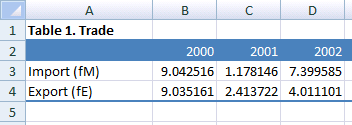
- Else,
work on Excel export. You may indicate a heading, labels for the
expressions, and a file name. For instance: "WPLOT <p> heading =
'Table 1. Trade' fM/fY 'Import (fM)' fE/fY 'Export (fE)' file = trade".
The '<p>' means annual percentage growth, and the variables are
the import and export shares of GDP, fM/fY and fE/fY. The result
is saved in the file 'trade.xlsx'. Without the file indication, the
result is shown on the screen. Depending upon your Excel version, the
file will be either trade.xls (Excel 2003) or trade.xlsx (Excel 2007).
- Version 1.0.36 -- 5/11
2010
- Installer file
(please close Gekko before installation!). NOTE: The RES command has a bug -- please
use 1.0.44 or above.
- Setup file (only relevant if you
have problems with the installer file)
- The
command "WRITE <xls>" has been fixed so that it also works under
Excel 2003, and not only Excel 2007. The Excel sheet has been given a
more modern look (same colors as Word 2007 headings) -- the look can be
reverted to the old one with "option interface excel
modernlook no".
- Version 1.0.35 -- 3/11
2010
- Installer file
(please close Gekko before installation!). NOTE: The RES command has a bug -- please
use 1.0.44 or above.
- Setup file (only relevant if you
have problems with the installer file)
- This
version will look for a file with the name 'isstart.cmd' in the working
folder (and run it if it exists). The version also accepts commands as
parameters to the gekko.exe file. Else, it is possible to comment out
blocks of code in command files by means of a '/*' (start comment) and
'*/' (end comment). For instance 'time 2002 /* comment here */ 2005' is
equal to 'time 2002 2005'. Using '/*' and '*/' are especially handy for
commenting out multiple lines. Last, the function key 'F2' inserts a
blank line in the command window.
- Version 1.0.34 -- 1/11
2010
- Installer file
(please close Gekko before installation!). NOTE: The RES command has a bug -- please
use 1.0.44 or above.
- Setup file (only relevant if you
have problems with the installer file)
- Some
small fixes. Most notably a new option: "option solve data createvars".
When this is set to "yes" (which it is by default), the MODEL statement
also creates any model variables not found in the Work databank (and
fills them with missing values).
Before, all variables not found in the databank would have had to
be created manually before they could have been filled with data by
means of the UPD and GENR statements.
- State
of the software: It seems to be running quite ok. The two most pressing
issues now are: (1) finishing the help system completely, and (2) error
messages. I believe I have found out why the error messages have become
so stupid lately. Will try to fix this soon, at the moment the error
messages are a disgrace......
- Version 1.0.33 -- 25/10
2010
- Installer file
(please close Gekko before installation!). NOTE: The RES command has a bug -- please
use 1.0.44 or above.
- Setup file (only relevant if you
have problems with the installer file)
- A
lot of small fixes. Model info is now stored in zip-files instead of
sub-folder. Some work on Newton algorithm. The .bat file creation menu
item has been reworked. Can now save data in Excel files: for instance
"write <2000 2010 xls> fY fE fM data.xls". It uses Excel
silently, and will save the file as a .xls or .xlsx file depending on
you Excel version (2003 or 2007). Lastly, a lot of work on
the help files. See the overview in the 'Help' tab.
- Version 1.0.32 -- 11/10
2010
- Installer file
(please close Gekko before installation!). NOTE: The RES command has a bug -- please
use 1.0.44 or above.
- Setup file (only relevant if you
have problems with the installer file)
- Mostly
fixing some bugs. Experimenting with compiler settings, seems to be
about 10-50% faster, and should work in 64-bit environments. A bug in
write<csv> has been fixed -- it put the output files in some
obscure place instead of the working folder.
- Version 1.0.31 -- 6/10
2010
- Installer file (please
close Gekko before installation!). NOTE: The RES command has a bug -- please use 1.0.44 or
above.
- Setup file (only relevant if you
have problems with the installer file)
- New
in this version: (a) Excel-integration (WPLOT) has been completely
reworked. It no longer uses Excel macros to do it, so it should be able
to run in all environments regardless of security and language
settings. (b) You can choose working folder from recent folders, see
File --> Recent folders... (c) Writing a csv-file works again. New
syntax: "write <csv> fXnm fXnk fXnq data.csv", or "write
<2005 2010 csv> #erhverv data.csv". This syntax emulates AREMOS'
way to do it. (d) Add-files and .cmd-files are now handled exactly like
PCIM. (e) Lastly, a recurring issue regarding Gekko window size
and user settings has been fixed (hopefully). Thanks to Christine for
her patience.
- Version 1.0.30 -- 28/9 2010
- Installer file (please
close Gekko before installation!). NOTE: The RES command has a bug -- please use 1.0.44 or
above.
- Setup file (only relevant if you
have problems with the installer file)
- This
pretty stable version has focused on being able to run the long
forecast from the Danish Ministery of Finance. Their system is
really testing the software, and being able to run their system means
that it seems reasonable to declare Gekko out of the beta stage. I've
also worked on error handling -- more to be done though... For Michael:
there is now an "option solve data ignoremissing yes" regarding how
Gekko deals with missing data when simulating. Please set this
option to "no" normally, but setting it to "yes" may emulate the
way PCIM works if you need a quick fix regarding missing values.
- Version 1.0.29 -- 13/9
2010 -- BETA
version.
- Installer file (please
close Gekko before installation!). NOTE: The RES command has a bug -- please use 1.0.44 or
above.
- Setup file (only relevant if you
have problems with the installer file)
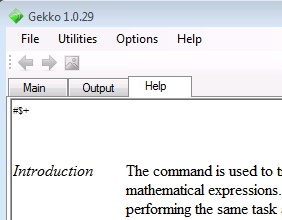
- Getting reasonably stable,
but still BETA.
Most of the stuff is working, but I need to stress-test it on
real-world forecasts before I would recommend it for other purposes
than testing. This version introduces tabs in the interface (see
below). The output tab is for bulky output, and the help tab is the
help system. The help system is being worked upon. At the moment, write
"help <command>" in the main window to call the help files.
- Version 1.0.28 -- 23/8
2010 -- Please do not use
this version for other purposes than testing -- it is a BETA
version.
- Installer file (please
close Gekko before installation!). NOTE: The RES command has a bug -- please use 1.0.44 or
above.
- Setup file (only relevant if you
have problems with the installer file)
- Still BETA, sorry, but stability is
improving! Decomposition
is working in a preliminary version. At this point, only multiplier
decomposition. When running multiplier analysis, you can for instance
write "udvalg fY" on a left-side variable (like "fY") and get a graph
with contributions. It is simple enough to export the values to Excel,
but before I prettify things, I think I need to think about how to
present this kind of output. Problem is that you often get a confusing
number of contributions, so some easy way to pool some of these could
be nice (pooling of lags would be a first step). Otherwise, all
commands work with time periods and lists (whenever it makes sense).
Time periods may be written as "prt 2010 2012 fY" or "prt <2010
2012> fY", where the first one alters global time settings, and the
last one does not.
- Version 1.0.27 -- 11/8
2010 -- Please do not use
this version for other purposes than testing -- it is a BETA
version.
- Installer file (please
close Gekko before installation!). NOTE: The RES command has a bug -- please use 1.0.44 or
above.
- Setup file (only relevant if you
have problems with the installer file)
- Still BETA ... but getting more
stable. There are a lot of small changes and bug-fixes. Major changes
are: faster Gauss-Seidel simulation (using model ordering info on
prologue and epilogue variables), absolute periods supported (for
instance: "prt fY/fY(2001q3)"). Macro's are implemented (again). There
is a problem with macro's in systems of command files calling each
other, however. So for now, please put macro's at the top in your
primary/"master" command file. (The issue is that Gekko compiles
whole command files into machine code now, instead of interpreting
line-by-line, and this complicates the use of macros. This will be
fixed somehow).
- Version 1.0.26 -- 4/8 2010
-- Please do not use
this version for other purposes than testing -- it is a BETA
version.
- Installer file (please
close Gekko before installation!)
- Setup file (only relevant if you
have problems with the installer file)
- This is a BETA
version and contains
the largest number of profound code changes in any Gekko version up to
now, because of a newly implemented ANTLR parser. The old Gekko version
did
so-called lexing (splitting input into words, so-called tokens),
whereas the new version does both lexing and parsing at the same
time.
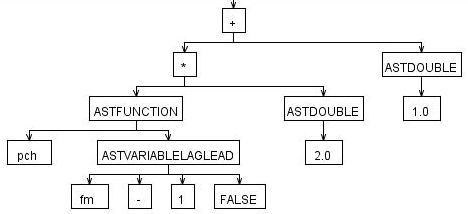
The parser outputs a tree structure a la what is shown
in the figure below (a so-called AST tree). Because of the new parser,
about 50% of all Gekko-code has been rewritten, so this is really heavy
surgery. There are still some commands missing (most notably macros),
but all in all most of the basic stuff is up and running. Some benefits
are already apparent: quarters and monthly frequency is handled in all
commands, and quarterly/monthly models can be simulated. Lists work
everywhere. Reading a model is faster, and whole command files
are converted into machine-code before running them, speeding things up
considerably. There are
many other benefits to using a real parser. Handling of models and
command files
syntax gets easier to work with, and the underlying Gekko code
gets more robust, too. In the long run this is exprected to pay
off, also
regarding error messages, suggestions etc. Without a "real" parser like
ANTLR, the Gekko code would slowly but surely grow more and more
complicated and
unmaintainable. Below is shown part of the AST tree corresponding to
the statement "genr pch(fY) = pch(fM(-1)) * 2 + 1 $" (only the
right-hand side of the statement is shown in the figure):
- Version 1.0.25 -- 25/3
2010 -- Please do not use
this version for other purposes than testing -- it is a BETA
version.
- Installer file (please
close Gekko before installation!)
- Setup file (only relevant if you
have problems with the installer file)
- This is a BETA
version because of the large number of pretty profound changes under
the hood. Work has been done on (1) the Newton algorithm (means/goals,
more robust now), (2) Gauss-Seidel convergence criterias, (3)
multi-threading (to keep the GUI responsive), (4) time iteration (now
done abstractly, facilitating use of quarters and months), and export
to Excel (via wplot command). Next in pipeline is work on the parser.
I've changed from GOLD parser to ANTLR. Implementing the parser will be
the last big infrastructure change in Gekko -- after that I think the
main building blocks are ok regarding further development. Excel
integration (wplot) is done with an injected VBA script, and seems ok
(at the moment it just prints a table with the variables). Using VSTO
is considered, but VBA is ok for simple things (and should work for any
Excel version).
- Version 1.0.24 -- 9/12 2009
- Installer file (please
close Gekko before installation!)
- Setup file (only relevant if you
have problems with the installer file)
- Work
on error messages when compiling a model with 'model' statement. The
problematic equations are now printed out on the screen, with the
probable error location(s) marked in red. NOTE: there was a bug in this
version, so that the inbuild equation browser looks odd.
- Version 1.0.23 -- 8/12
2009
- Installer file (please close Gekko before installation!)
- Setup file (only relevant if you
have problems with the installer file)
- Work
on automatic residual check. Click the menu Utilities -->
Compare/check equations... to see how to do it (the menu item contains
a guide). The residual check will split equations into types (e.g. _I,
_S, and so on), and will sort the results alphabetically, by absolute
differences, or by relative differences. Relative differences are often
the best choice. A similar menu item is available for databank
comparison, see Utilities
--> Compare/check databanks... All compare stuff can only be called
from the menu, and the previsous ugly "samro" etc. statement is removed
from the Gekko commands. More facilities regarding residual check will
be added, for now it is just a prototype.
- Version 1.0.22 -- 5/11 2009
- Installer file (please close Gekko before installation!)
- Setup file (only relevant if you
have problems with the installer file)
- It
seems there was a bug when the Gekko window size and position was
stored. The bug occurred when the Gekko window was minimized, and the
user then exited Gekko in a minimized state. It is now checked
whether window size/positions are ok when loaded from last session. And
window size/positions are no longer stored if the window is maximized
or minimized. (Special thanks to Christine for struggling with this
bug).
- Version 1.0.21 -- 1/11
2009
- Installer file (please close Gekko before installation!)
- Setup file (only relevant if you
have problems with the installer file)
- Fixed
an issue in TSP data conversion, should work again. Added a "compare"
command that compares variables in model, databank and variable list,
to see if some are missing (or superfluous). Output from the comparison
will be in the file compare.txt.
- Version 1.0.20 -- 26/10
2009
- Installer file
(gekko_install.msi)
- Setup file (only relevant if you
have problems with the installer file)
- More
work on equation browsing and the "disp" command. The variable
list must be put into the .frm file, and a "varlist$"-tag
should be put before the list. Like that, it gets automatically
loaded when the model is loaded via the "model" statement. When using
the "disp" command, the variables are clickable, and there are two
browser buttons to use (backwards and forwards, like internet
browsing). It still needs some polishing. Should be integrated with
decomposition at some point.
- Version 1.0.19
-- 17/10 2009
- Installer file
(gekko_install.msi)
- Setup file (only relevant if you
have problems with the installer file)
- The "disp" command show more
info. Upgrading without uninstalling should be possible now.
- Version 1.0.18
-- 15/10 2009
- Installer file
(gekko_install.msi)
- Setup file (only relevant if you
have problems with the installer file)
- Basically just the same as
1.0.17, to try out upgrading/versioning.
- Version 1.0.17
-- 14/10 2009
- Installer file
(gekko_install.msi)
- Setup file (only relevant if you
have problems with the installer file)
- Some
small fixes, does not lock files when it reads them. Preliminary
version of variable list can be tried ("varlist varlist.dat"). After
this, you may try "disp [variablename]" to see the labels. This will be
worked into an equation browser.
- Version 1.0.16
-- 10/10 2009
- Installer file
(gekko_install.msi)
- Setup file (only relevant if you
have problems with the installer file)
- Version numbers are now
implemented, and installation has been simplified (you only need to
execute one .msi file, and you don't need to uninstall first).
Hopefully this will make upgrading easier. Also some small fixes,
including a "clear screen" command ("cls"), and showing info on the
work and baseline databanks.
- Version 1.0.15 -- 8/6 2009
- Installer.
- Comparing two databanks made
easy. Simply "read <databank1>" followed by "read
<databank2> followed by "samro". This produces a file
called "sam<index>.txt" with the differences (ordered by relative
differences). There are 4 ways to use it: sama (absolute,
alphabetical list), samr (relative, alphabetical list), samao
(absolute, ordered list), samro (relative, ordered list).
Ooooops, thinking about it, the first two produce precisely the same
file .... but never mind. The syntax is ugly anyway, to be fixed soon
hopefully. You can also specify a period: "samro 1990 2005".
- Version 1.0.14 -- 27/3
2009
- Installer.
- There was a bug
regarding reading of tsd files. Gekko rescales timeseries in RAM,
starting out with an array of length 200 for each time series (can hold
200 observations). If this is exceeded, the timeseries is rescaled to
length 300 etc. However, the bug meant that the timeseries was only
rescaled, and not filled with new data. It only affects databanks
running to around year 2100, which is why the bug has not been found
until now. Reading the same bank two times worked as a workaround, but
the bug is fixed now. In addition, rudimentary support for updprt
is added. Works only for annual data, and for operators = and +.
Example: "updprt + fy fm fcp". This produces upd statements for the
given global period. Has to be copied from the screen (mark it, and
Ctrl+C and Ctrl-V).
- Version 1.0.13 -- 24/3
2009
- Installer.
- There seemed to be a problem
with csvwrite confusing decimal and thousand separator and thus
creating garbage under some Windows language settings. Csvwrite is now
set to write in scientific format (just like normal tsdwrite), we'll
see if it works. The problem only affects some computers.
- Version 1.0.12 -- 23/2
2009
- Installer.
- Apparently the "efter"
command had ceased working -- this bug is fixed. Also implemented
PCIM's syntax regarding "mulpct" and "pctprt". In the long run, all the
syntax will be made more clean and consistent (and hopefully
AREMOS-like). Also, the whole Visual Studio project has been cleaned up
completely, and the installer seems to work.... (and Subversion/SVN is
now used for versioning).
- Version 1.0.11 -- 18/2
2009
- Installer.
- Fixed an I/O bug. When the
user opens Gekko from Start --> Programs, the previous working dir
is read from a xml file. Gekko did not check if the previous working
dir might have been deleted in the meantime, and if so Gekko did not
even start up.
- Version 1.0.10 -- 15/12
2008
- Installer.
- Changes: "Csvwrite" writes
.csv format (Gekko already reads it). The syntax is csvwrite
<filename> <startyear> <endyear> <var1>
<var2> ... The variables can be a list, and providing start and
end year can be omitted. The filename has .csv appended if missing. If
no variables are provided, the whole work bank is written. Pathnames
are not allowed for the file. The whole system needs to implement the
parser, otherwise allowing e.g. a file path here leads to complicated
coding. Csv is a quite nice format for interfacing with Excel, and
double-clicking a csv-file should open it in Excel directly. In
addition, error handling is changed a little bit, to provide a better
user experience.
- Version 1.0.9 -- 17/11
2008
- Installer.
- Changes: Reads AREMOS-type
tsd files. It assumes more structure in the tsd files (e.g. that the
data fields are exactly 15 characters wide), and does not have problems
with labels containing any characters. It even reads tsd files faster
than before. (The old and more robust way to parse a tsd file can still
be called with "read2 <filename>" if needed).
- Version 1.0.8 -- 1/11
2008
- Installer.
- gekko.exe and other program
files as a simple .zip-file here.
- Changes: lists of endogenous,
true exogenous and JDZ-type exogenous are made and put into
"<model>_info" folder. Information about the number of these vars
is provided when a model is loaded.
- Version 1.0.7 -- 28/8
2008
- Installer.
- gekko.exe and other program
files as a simple .zip-file here.
- UPDATE: tsd reader fixed
- Changes: quarters and months
implemented! Actually the databank structure was already designed to
deal with it, but it took some coding to parse stuff like "time 2001m3
2005m12". It only works for the upd, print/plot and
read/tsdread commands at the moment, so don't try any quarterly
models yet. So it is kind of a proof of concept, in order to prove that
it is possible. You may try this: set freq q // time 2001q1 2003q4 //
upd xx = 100 // upd xx 2001q2 2003q4 % 1 // p xx. Variables with the
same name but different frequency may co-exist in the same databank. It
reads a mixed-frequency tsd file produced by AREMOS just fine.
- Version 1.0.6 -- 20/8
2008
- Installer.
- gekko.exe and other program
files as a simple .zip-file here.
- Changes: The syntax in
Backus-Naur form (BNF) has been corrected a little bit. And suggestions
are shown in a box when typing. See image below. Suggestions may be
switched off in the options menu. To see how it works, try typing "set"
<space> "solve" <space> "method" <space>. When typing
space the parser suggests the next item by means of the BNF syntax. You
may select from the menu by arrow down + Enter or double-clicking with
the mouse. As of now this functionality is still a bit buggy and needs
to be tested. But it will be helpful if/when the syntax gets more
AREMOS-like. HMMMMM: actually it is really annoying that the menu box
cannot extend down below the status line ("Annual ...." in the image).
Should be fixed soon!
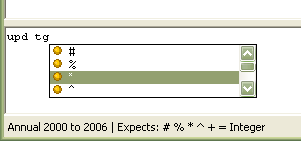
- Version 1.0.5 -- 10/8
2008
- Installer.
- gekko.exe and other program
files as a simple .zip-file here.
- Changes: add-command added,
and support for using @-symbol in genr and print statements (means
taking the variable from the baseline bank). In addition, a real
parser/lexer has been implemented. As of now just for fun -- only
effect is that it provides suggestions for the next statement at the
bottom of the Gekko window. Next step is more meaningful error messages
etc. The PCIM syntax has been stated in the so-called Backus-Naur form
(BNF), as can be seen here.
- Version 1.0.4 -- 7/7 2008
- Installer.
- gekko.exe and other program
files as a simple .zip-file here.
- Changes: Some more commands
in order to run the model as used by the Ministry of Finance. For
instance: macro, dumon/of, create, delete, flat, efter, return, stop.
Fixed one bug in the upd command (when upd'ing lists). Upd command can
create variables with '=' operator if the variable starts with 'xx'.
Documentation updated. Gekko syntax really needs to be settled
sometime: is a very ugly mix of PCIM and AREMOS at the moment!
- Version 1.0.3 -- 8/6 2008
- Installer.
- gekko.exe and other program
files as a simple .zip-file here.
- Changes: Numerous
improvements due mostly to feedback from Hans Lunsing. Should provide a
more user-friendly experience. There are some new set options, and it
is possible to get a list of current settings. Option menu reworked.
Possibility to reset the program state, and option to clear all
databanks. When saving a graph, the user can provide a name for the
file. Documentation is made less PCIM-centric with more explanations of
PCIM syntax.
- Version 1.0.2 -- 28/4
2008
- Installer.
- gekko.exe and other program
files as a simple .zip-file here.
- Changes: Full implementation
of exogenization by means of D-variables (via formula codes like
_GJRD). The reverted J-variables (add-factors) are now calculated, so
PCIM-style exogenization and re-endogenization is now possible.
Regarding the "after model", any formula beginning with "Y" in the
model part following the AFTER$ statement will only be run once after
the model has been solved (typically this is reverted J-variables added
by hand). All other equations in the ADAM after model are treated as
normal endogenous variables. Gekko's ordering algorithm puts them in
the epilogue automatically. In conclusion: Gekko now reads jul05.frm or
apr07.frm just as they are with no changes necessary.
- Version 1.0.1 -- 23/4
2008
- Installer.
- gekko.exe and other program
files as a simple .zip-file here.
- Changes: In the SAFFIER
model, one of the equations was accidently commented out. Has been
switched on. So now the equation count in SAFFIER is 2979 as it should
be. In Gekko, the ordering algorithm is improved. SAFFIER's feedback
set is now down to 41. Pretty close to what ISIS produces (38). Note:
Gekko keeps info about ordering in the file <model>.ordering.
|
 Gekko
Gekko
 Development versions